Plan the year
- Academic-year overview, August 2026 to July 2027
- 2026 and 2027 calendar reference pages
- Important dates log
- Twelve dated monthly calendar spreads
SAGEBELL CLASSROOM YEAR
48 pages for lesson planning, attendance, grades, schedules, student records and classroom organisation — in three formats, so you can print it, annotate it on a tablet, or do both.
$19
One-time payment. Instant digital download through Gumroad.
Dated August 2026–July 2027 — ready for the first day of school.
Secure checkout and file delivery through Gumroad.

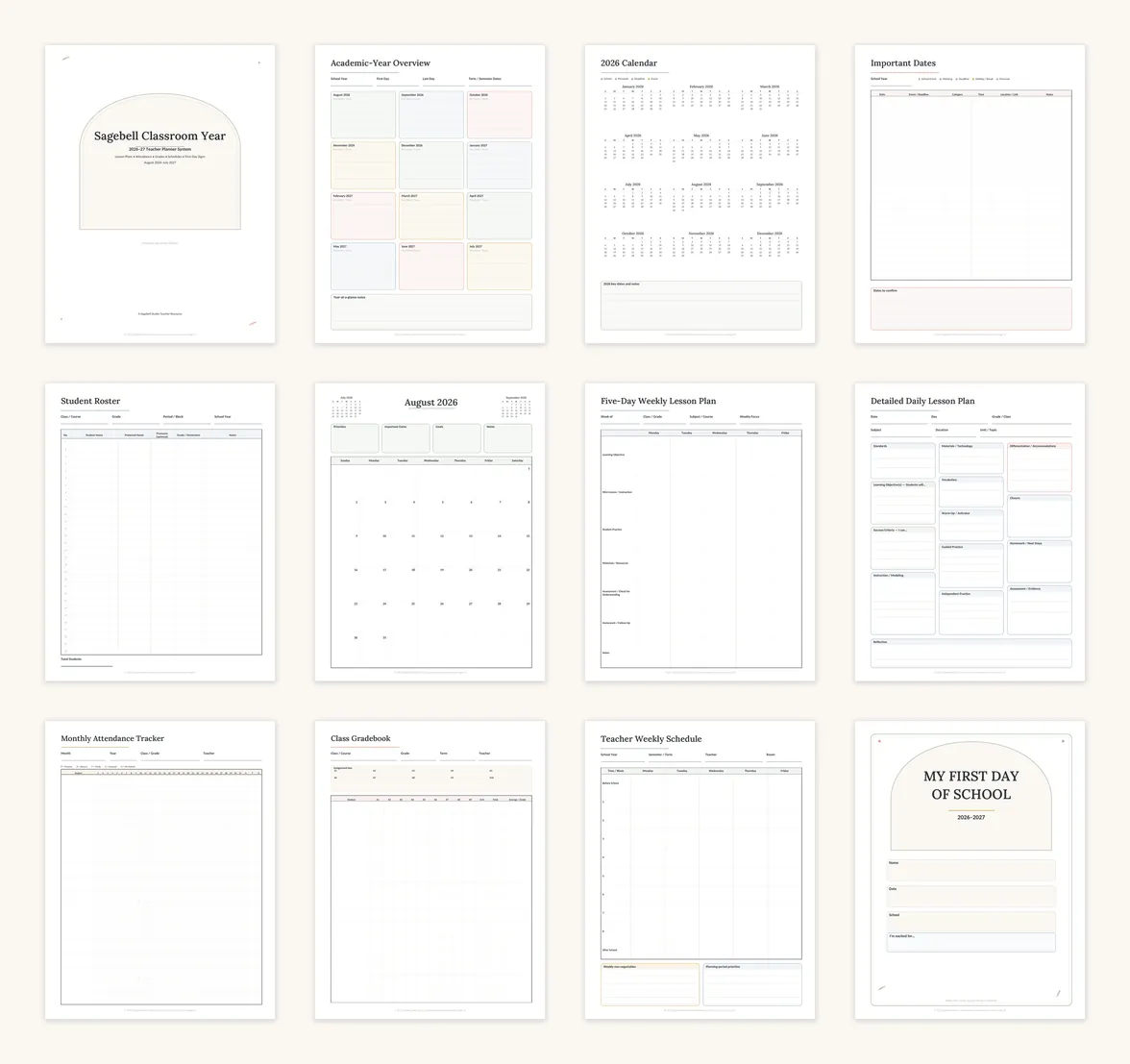
EVERY PAGE, RENDERED FROM THE FINISHED PDFS
These previews come straight from the delivered files. Nothing here is a mock-up.
Select any preview to enlarge it. Previews are rendered from the actual planner pages.
WHAT’S INCLUDED
THREE FORMATS, ONE PURCHASE
All three are included. You can print the pages you use most often and keep the landscape edition on your tablet, or use one format exclusively.
Digital
HOW THE DIGITAL EDITION NAVIGATES
The landscape edition carries internal PDF links on every page. Section tabs run down the left edge, month tabs down the right, and sub-navigation sits inside each section, so you can move between lesson plans, attendance, grades and any month without scrolling through 48 pages.
This recording was made in GoodNotes for Windows. iPad has since been tested separately: all 726 internal links work in GoodNotes on iPad, with a single tap, no zooming and no need for the Open Link menu. Behaviour in other annotation apps has not been tested.
READY WHEN YOU ARE
$19
Three 48-page editions, first-day signs and the Start Here guide.
Dated August 2026–July 2027 — ready for the first day of school.
Secure checkout and file delivery through Gumroad.
Launch offer
A launch discount is running for the start of the 2026–27 school year. The code is applied automatically when you open the offer link.
The standard price is $19. The discounted total is shown at checkout before you pay.
QUESTIONS
No. These are finished PDFs. Canva templates and links are not included.
You can handwrite, highlight, type annotations and add stickers in your annotation app. The original text, dates, tables and layout are fixed.
Yes — tested on iPad in GoodNotes. All 726 internal links work, and a single tap follows a link, with no zooming and no need for the Open Link menu. Behaviour in other annotation apps varies and has not been tested.
It may work in any app supporting internal PDF hyperlinks. Behaviour varies.
Yes. Choose Actual Size or 100%, portrait, and the file matching your paper.
Planner pages: 24–32 lb / 90–120 gsm.
Signs: 65–110 lb / 176–300 gsm.
Monthly calendars are dated August 2026–July 2027. The lesson, attendance, grade and schedule pages are undated and reprintable.
Instant digital download through Gumroad. No physical item ships.
One-classroom personal-use license for one teacher, non-transferable. Print and reprint for your own classroom. Do not share, resell or redistribute the files.
Each additional teacher needs their own license; contact support@sagebellstudio.com for school-wide licensing.
7-day limited refund policy
Refund requests are considered within 7 days of purchase for duplicate purchases or verified file-access or technical problems that Sagebell Studio cannot resolve.
Because this product is an instant digital download, refunds are not offered for change of mind, accidental purchase, or device or software incompatibility where the product requirements were clearly stated before purchase.
Before requesting a refund, contact support@sagebellstudio.com with your Gumroad order number and a description of the issue. This policy does not limit any rights required by applicable law.
Last updated Aug 2, 2026
LICENSE & REFUNDS
One-classroom personal-use license for one teacher, non-transferable.
Print and reprint for your own classroom. Do not share, resell or redistribute the files.
Each additional teacher needs their own license. Contact support@sagebellstudio.com for school-wide licensing.
Refund requests are considered within 7 days of purchase for duplicate purchases or verified file-access or technical problems that Sagebell Studio cannot resolve.
Because this product is an instant digital download, refunds are not offered for change of mind, accidental purchase, or device or software incompatibility where the product requirements were clearly stated before purchase.
Before requesting a refund, contact support@sagebellstudio.com with your Gumroad order number and a description of the issue. This policy does not limit any rights required by applicable law.
Last updated Aug 2, 2026
FREE FIRST-DAY SIGNS
Four printable first-day-of-school signs in US Letter and A4. Free, delivered instantly through Gumroad.
Checkout is handled by Gumroad. You will also hear from us when new planner editions are released.
CONTACT & CUSTOMER CARE
We are here to help with general enquiries and questions about your digital purchase.
GENERAL ENQUIRIES
CUSTOMER SUPPORT
Email links open the default mail application configured on your device. Use Copy email when no mail application is configured.
For help with a purchase, include your Gumroad order number when contacting support.
Support messages are answered within two business days, Monday to Friday.